
What MCP changed: giving AI hands
Contents
For a long time, developing with an AI meant pasting source in and pasting the reply back by hand.
The AI read text and returned text; it could not lay a finger on the actual environment. So describing the current state was our job, and every answer that came back rested on "it's probably like this."
MCP is a common socket that lets an AI touch the outside environment
Connected through it, an AI does more than return text: it queries a database, drives a browser, checks the state of a deployment. What changed is not its ability but its reach.
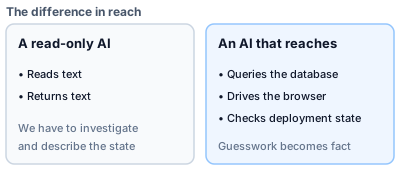
Figure 1: The reach is what changed
Deep dive: answers that rested on guesswork
Telling an AI that cannot touch anything about the current state was our job. Anything left out came back as guesswork, and the returned code was built on "it's probably like this." A lot of our rework started there.
The first gain was checking the present state directly
Learning how a database was defined previously meant reading the change history from the top. A diff is a record of what was once done, not a description of how things are now.
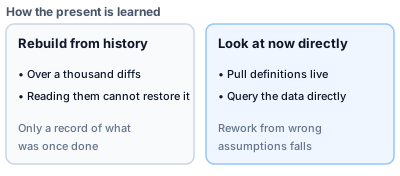
Figure 2: Stop reconstructing from history; look at now
Deep dive: library usage is another "look at now"
An AI's knowledge stops at the point it was trained, so it can return plausible-looking code in a style that has since been retired. Pulling the official documentation live, at the version in use, cuts out the detour of discovering afterwards that the pattern is deprecated and rewriting.
The second gain was running the real thing and watching it
Reading code does not tell you whether the screen actually works, or whether the deployment really went out. There is always a gap between "it should work" and "it is working."
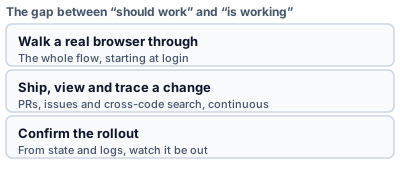
Figure 3: Three routes across the gap
Deep dive: drift no amount of reading reveals
Code can pass on the page and still fail to navigate right after login on a real device. That kind of runtime drift only shows up when something touches it. "I shipped it" is the other trap; turning "it should be out" into "I watched it be out" takes an actual look.
Being able to touch means being able to break
Handing over a redeploy, intending only to rebuild a preview environment, pulled in the production alias as well. That is an accident a read-only AI could never cause.
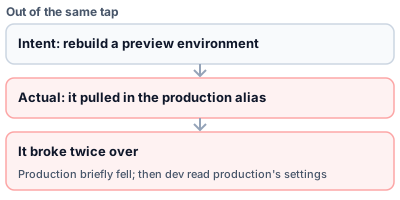
Figure 4: Convenience and danger come out of the same tap
Deep dive: it broke twice over
Beyond production briefly going wrong, the development environment then read production's settings and broke as well. What that taught, first-hand, is that drawing the permission line cannot be deferred.
So the line between what it can read and what it can write is the lifeline
A guard against writing does not attach itself. The only thing that binds it is the procedure.
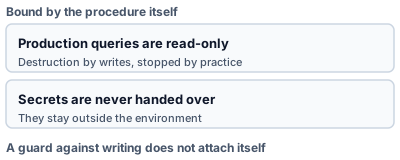
Figure 5: Two lines held by procedure
Deep dive: the further in, the more to watch
Beyond connecting off-the-shelf ones, we ended up building our own for operating our product. As what is possible grew, so did the number of lines to draw. Making our own CTEM data reachable from an AI is covered in Connecting CTEM data to AI agents over MCP.
Give it hands, but keep hold of the reins
Checking the present directly and watching the real thing run cut the rework that came from guessing. At the same time, being able to touch is exactly what makes accidents possible.
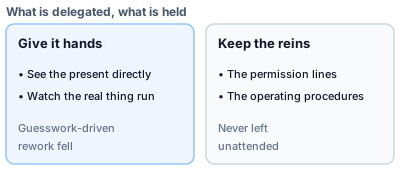
Figure 6: More can be delegated; none of it is left unattended
Deep dive: where the line settled this year
The reins — the permission lines and the operating procedures — stay with people. More can be handed over, but none of it is left unattended. That is roughly where a year of learning put the line.
- Connecting CTEM data to AI agents over MCP: asking an AI about your own attack surface
- How our micro-SaaS tech stack changed in a year
- Two-track review with Claude and Codex: surfacing blind spots with a different AI lineage
- Posts on our development work (dev category)
Feeling our way through building it is how PentaTrail / CTEM came about — a service that uses AI to continuously map the attack surface your company presents to the outside.
Appendix: what we connected, and what it changed
Table 1: checking the present state
| Connected | What became possible | What it removed |
|---|---|---|
| Database | Query the present definitions and data directly | Reconstructing the current state from history, and getting it wrong |
| Official library documentation | Pull the correct usage for the version in use, live | Writing in a retired style and rewriting afterwards |
Table 2: running the real thing
| Connected | What became possible | What it removed |
|---|---|---|
| Browser | Walk the whole flow from login for real | Missing runtime drift |
| Code hosting | Handle PRs, issues and cross-code search | The split between shipping, viewing and tracing a change |
| Deployment target | Confirm rollout and errors from state and logs | Sitting on "I shipped it" without knowing |
Table 3: the lines drawn
| What is fixed | What it prevents |
|---|---|
| Queries against the production database are read-only | Destruction through writes |
| Secrets are never handed to the AI; they stay outside the environment | Keys and tokens leaking |
| Permission lines and operating procedures stay with people | Accidents from leaving it unattended |
Visualize your attack surface with PentaTrail CTEM/ASM
From discovery to vulnerability validation and remediation — all powered by the CTEM framework.
Get Started