

Threat Exposure Risk: technical risk multiplied by business risk
Contents
A CVSS 10.0 vulnerability on a private test box and a CVSS 6.0 vulnerability on the production system holding customer data are not the same problem, and the second one is closer to real harm. Technical severity and business consequence are different measurements.
Threat Exposure Risk (TER) crosses those two on a single table and lands every finding in one of five bands, S through D.
TER is a band produced by crossing technical rank with asset weight
A three-by-three table decides it: Threat Discovery Level (TDL) down the side, Business Impact (BI) Score across the top. The heaviest band, S, is reached only by the top two TDL ranks sitting on a high-BI asset.
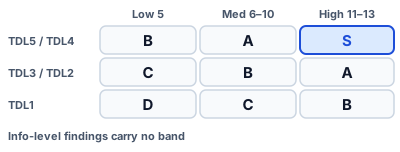
Figure 1: Technical rank down the side, asset weight across the top
Deep dive: info-level findings carry no band
Anything a scanner reports as info skips the table and keeps an empty band. It falls out of prioritization, so no deadline attaches to it. It is also left out of the band counts, which means a flood of info-level findings never moves the distribution.
The band also sets the deadline, counted from the day of discovery
Each of S through D carries a number of days, and the clock starts the day the finding was first seen. Anything past its date is counted separately as overdue.
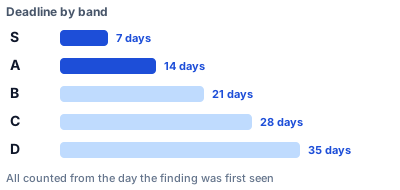
Figure 2: Days per band, counted from first discovery
Deep dive: move the band and the deadline moves with it
Because the deadline hangs off the band, tagging an asset so its BI rises shortens the deadline on the same vulnerability. In the other direction, a finding an active check could not reproduce drops one TDL rank, lands in a lighter band, and gains time. Nobody edits a date by hand.
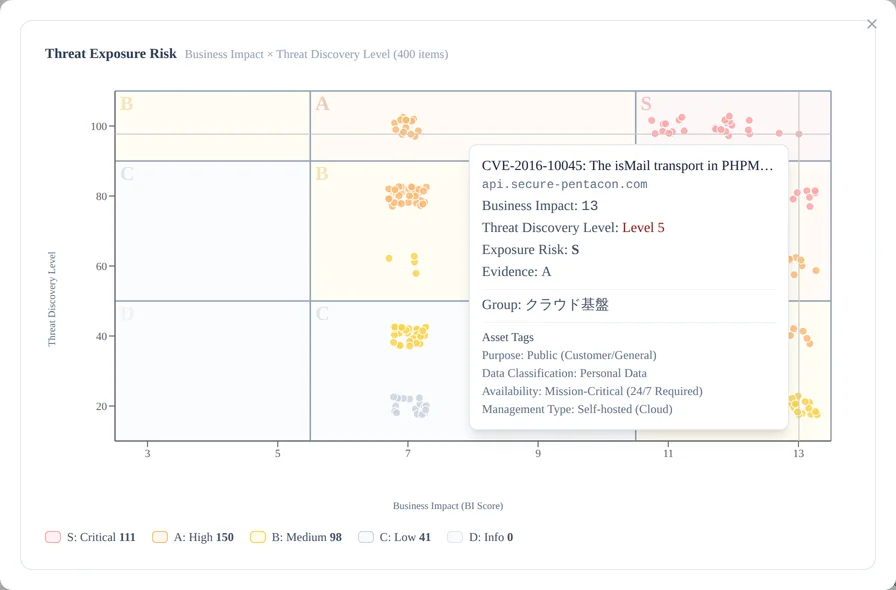
The TER map is those same two axes drawn as a scatter plot
Knowing how the table works still doesn't tell you how much has piled up, or where. Plotting the same two axes and placing one dot per finding is what the TER map does.
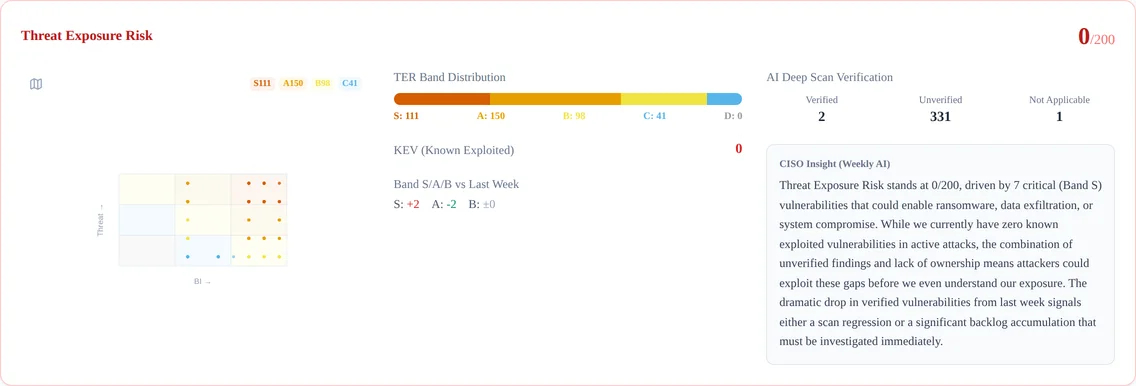
Figure 3: The TER map on the dashboard (BI across, effective TDL up)
Deep dive: where the dots gather changes the reading
A cluster in the top right means serious threats on important assets, and the place to start is obvious. Dots spread thinly across the plot call for broad, systematic work instead. A concentration in the bottom left reads as only light findings left.
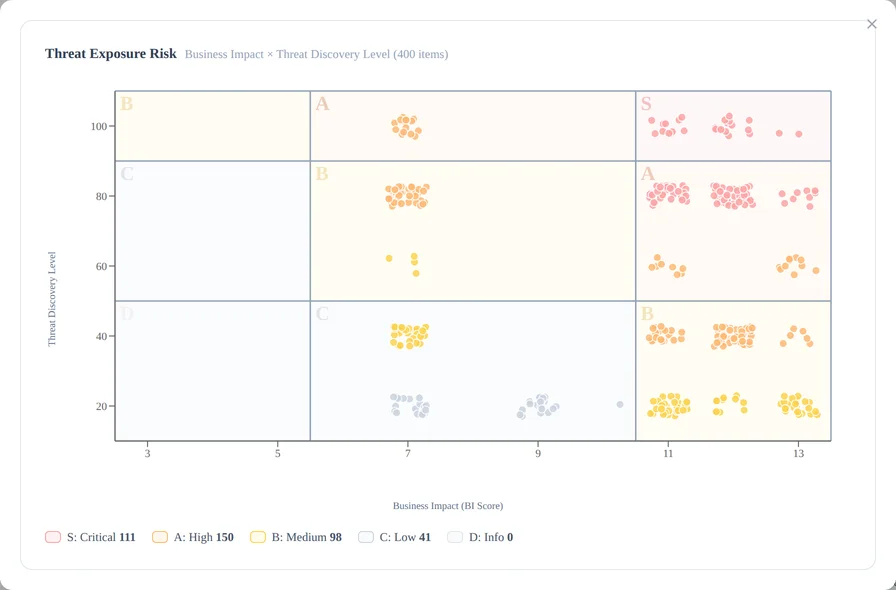
Hovering a dot shows that finding's CVE, target FQDN, BI score, effective TDL, band, owning group and asset tags. You read the shape of the whole first, then drop straight to one finding.
Of CTEM's five stages, TER covers prioritization
Scope it, discover it, order it, verify it, mobilize. TER is the third of those, taking what the earlier stages gathered and producing only the order.
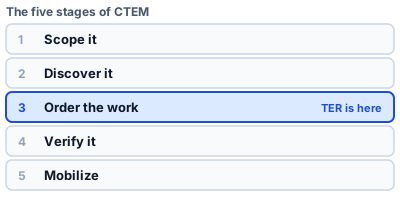
Figure 4: TER carries the third stage
Deep dive: the stages on either side move the band
Asset tags applied during scoping become the BI score, and the CVSS and EPSS values collected during discovery become the TDL. Verification results feed back into TDL as well, so a band is never fixed once set; it is redrawn every time the loop comes round. What is CTEM? covers the whole cycle.
Engineering and the business end up discussing risk in one vocabulary
Band counts and a week-on-week delta carry the situation without a single piece of jargon. "Three S findings, all concentrated on the core storefront" tells the person receiving the report where to act.
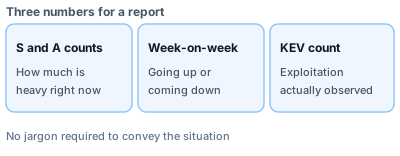
Figure 5: The three numbers a report needs
- What is the Threat Discovery Level (TDL)?
- What is a Business Impact (BI) Score?
- What is a security score? Visualizing the attack surface on a 400-point model
- What is CTEM? How it differs from traditional vulnerability management
Seeing which band your own findings land in is free to try for 14 days.
Appendix: the bands, and the axes of the map
Table 1: TER bands and deadlines
| Band | Deadline (from discovery) | Typically |
|---|---|---|
| S | 7 days | Top two TDL ranks on a high-BI asset |
| A | 14 days | Mid TDL on high BI, or top TDL on medium BI |
| B | 21 days | Top TDL on low BI, mid TDL on medium BI, TDL1 on high BI |
| C | 28 days | Mid TDL on low BI, or TDL1 on medium BI |
| D | 35 days | TDL1 on low BI |
| (none) | No deadline | Info-level findings |
Table 2: the table that turns TDL and BI into a band
| TDL \ BI | 5 (low) | 6–10 (medium) | 11–13 (high) |
|---|---|---|---|
| TDL5 / TDL4 | B | A | S |
| TDL3 / TDL2 | C | B | A |
| TDL1 | D | C | B |
Table 3: the axes of the TER map
| Axis | Meaning |
|---|---|
| Horizontal | BI score (5–13; further right means a more important asset) |
| Vertical | Effective TDL (TDL1–TDL5; higher means more severe) |
| Colour | TER band (S/A/B/C/D, chosen for colour-vision accessibility) |
How TDL is derived is covered in What is the Threat Discovery Level (TDL)?, and how BI is derived in What is a Business Impact (BI) Score?.
The values in this post were checked against PentaTrail's own routines (asm_get_band and asm_finding_sla_days) on 2026-08-17.
Visualize your attack surface with PentaTrail CTEM/ASM
From discovery to vulnerability validation and remediation — all powered by the CTEM framework.
Get Started