

What is a security score? Visualizing the attack surface on a 400-point model
Contents
The industry convention for expressing security posture as a number is a single score out of 100. The trouble with one number is that when it drops, it doesn't say what got worse.
PentaTrail scores out of 400 instead, split across three axes — threat, management maturity and response — with the breakdown always shown alongside.
The composite score is three axes added together, out of 400
Threat carries 200 points, management maturity 100 and response 100. Because the breakdown sits next to the total, a movement in the total points at the axis that caused it.
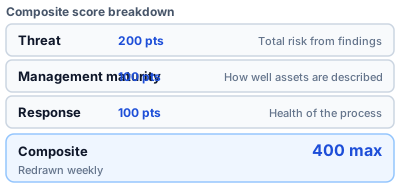
Figure 1: The three axes and their point allocations
Deep dive: how it appears on the dashboard
The top of the Executive Dashboard carries the composite score, the change from last week and a trend line. It is redrawn weekly, and earlier weeks can be selected.

The threat score starts at 200 and subtracts three kinds of penalty
Open findings are aggregated per host by TER band, and the result is subtracted from a base. What gets deducted is the spread of S, the pile-up of S, and KEV listings.
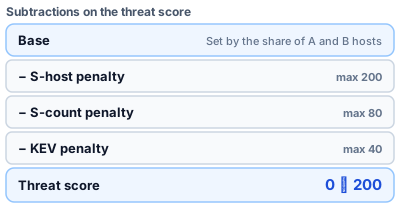
Figure 2: Three deductions taken off the base
Deep dive: how the base is derived
The base counts hosts whose heaviest open band is A at a weight of 0.5 and those at B at a weight of 0.1, divides by the total active host count, and takes that proportion off 200. Hosts carrying an S band are handled by a separate penalty and are excluded here. Hosts at C and D do not move the base at all.
base = 200 × (1 − (A hosts × 0.5 + B hosts × 0.1) / total active hosts)
threat = max(0, min(200, ROUND(base) − S-host penalty − S-count penalty − KEV penalty))
The spread of S and the pile-up of S are counted separately
One critical finding across ten hosts and ten findings on a single host are different shapes of attack surface. So the penalties are split into two independent axes.
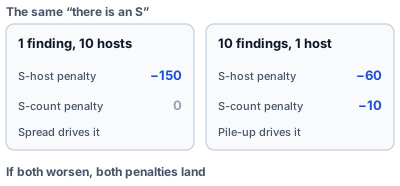
Figure 3: The same "there is an S" deducts differently depending on its shape
Deep dive: the two penalty tables
The S-host penalty steps with the number of distinct hosts carrying an S-band finding: 60 for one host, 110 for two or three, 150 for four to ten, 180 for eleven to thirty, and 200 beyond that.
The S-count penalty steps with the number of distinct findings classified S: nothing up to five, 10 for six to twenty, 25 for twenty-one to fifty, 50 for fifty-one to a hundred, and 80 above that.
The KEV penalty is 5 points per open KEV-listed finding, capped at 40.
Management maturity turns three rates directly into points
Grouping rate is worth up to 40 points, asset classification up to 40, and owner assignment up to 20, each contributing in proportion to how far along it is. The two carrying weight 0.4 are the ones that move the number; owner assignment is a supporting term.
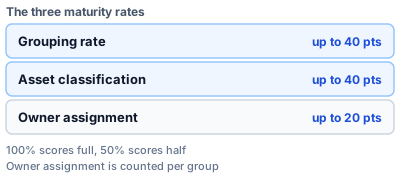
Figure 4: The three rates and their ceilings
Deep dive: the rates contribute proportionally
At 100% a rate scores its full allocation, at 50% it scores half. Grouping at 100%, classification at 70% and owners at 50% gives 40 + 28 + 10, or 78 points.
The classification rate counts hosts carrying at least one of the three BI Score tags (purpose / data_classification / availability). All three are not required. Owner assignment is the one rate counted per group rather than per host.
Response is the decision rate with overdue work subtracted
The S overdue rate is subtracted at weight 0.5 and the A-through-D overdue rate at weight 0.15. The state of "we are detecting fine but remediation has stalled" surfaces right here.
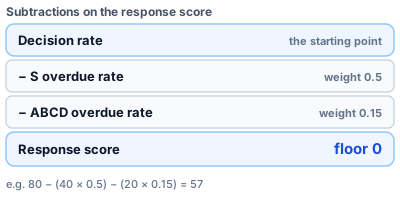
Figure 5: Two overdue rates taken off the decision rate
Deep dive: "resolved" and "closed" are different states
Resolved is the point where an owner has declared the fix made, and it stays in the population pending confirmation by the next scan. Closed is the state after a scan has actually confirmed the fix and the task has dropped out on its own. The decision rate counts resolved as decided, and excludes closed from the population entirely.
If there are no live tasks at all, the score is full marks when no open non-info findings remain, and zero when such findings are still there. Marking tasks as not-required, or simply leaving them, does not produce full marks.
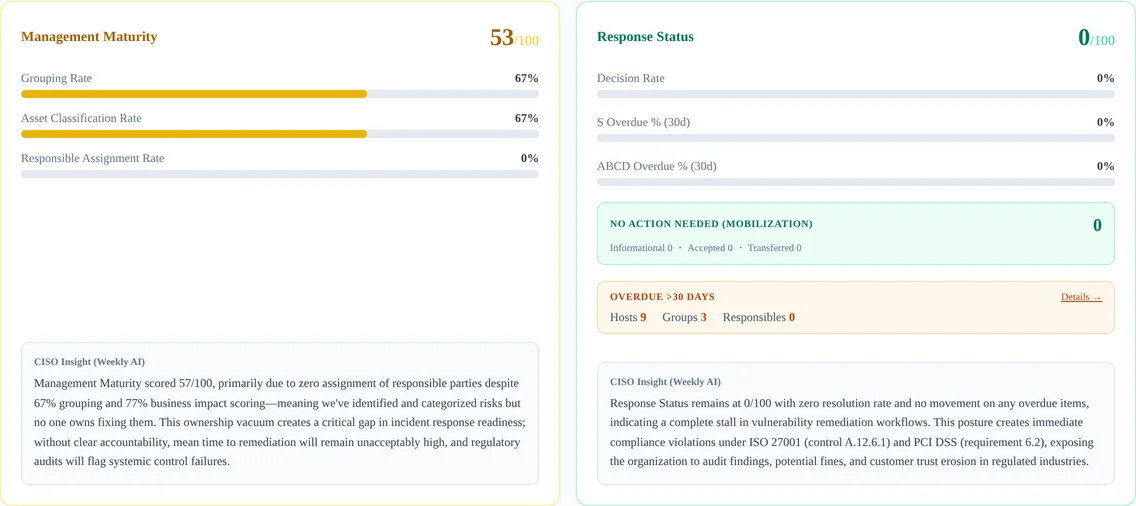
When the total drops, the breakdown says which axis pulled it down
The move to make depends on which of the three fell. Threat points at the count of S and A, management maturity at the state of the inventory, and response at stalled decisions.
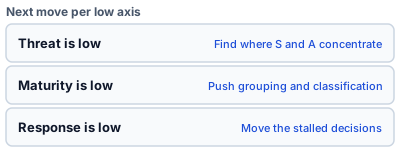
Figure 6: A different next move for each axis that is low
- Threat Exposure Risk: technical risk multiplied by business risk
- What is a Business Impact (BI) Score?
- What is the Threat Discovery Level (TDL)?
- What is CTEM? How it differs from traditional vulnerability management
Measuring your own attack surface against this model is free to try for 14 days.
Appendix: penalty tables and how to read the total
Table 1: S-host penalty (spread)
| Hosts carrying an S band | Penalty |
|---|---|
| 0 | 0 |
| 1 | −60 |
| 2–3 | −110 |
| 4–10 | −150 |
| 11–30 | −180 |
| 31 or more | −200 |
Table 2: S-count penalty (accumulation)
| S-band findings | Penalty |
|---|---|
| 0–5 | 0 |
| 6–20 | −10 |
| 21–50 | −25 |
| 51–100 | −50 |
| 101 or more | −80 |
Table 3: the three axes and their metrics
| Axis | Points | Meaning | Main metrics |
|---|---|---|---|
| Threat | 200 | Total risk from detected vulnerabilities | Count and distribution of TER bands (S/A/B/C/D) |
| Management maturity | 100 | How well asset information is maintained | Grouping rate, asset classification rate, owner assignment rate |
| Response | 100 | Health of the remediation process | Decision rate, S overdue rate, ABCD overdue rate |
Table 4: colour bands on the composite score
| Composite score | Rating | Colour |
|---|---|---|
| 320–400 | Good | Green |
| 240–319 | Fair | Yellow |
| 0–239 | Needs attention | Red |
Table 5: the observations feeding the threat score
| Type | What is examined |
|---|---|
| SSL/TLS configuration | Certificate expiry, TLS version, cipher suites, HSTS |
| Open ports and services | Unnecessary ports, legacy protocols, externally exposed admin panels |
| Vulnerabilities | Known CVEs, patch lag, software versions |
| DNS configuration | SPF / DKIM / DMARC, DNSSEC, zone transfer restrictions |
| Information exposure | Error messages, directory listing, version banners, unnecessary HTTP headers |
Remediation deadlines are set per TER band: 7 days for S, 14 for A, 21 for B, 28 for C and 35 for D. Threat Exposure Risk covers them.
The values in this post were checked against PentaTrail's own routine (asm_get_executive_score) and the dashboard's display thresholds on 2026-08-17.
Visualize your attack surface with PentaTrail CTEM/ASM
From discovery to vulnerability validation and remediation — all powered by the CTEM framework.
Get Started